Showing posts with label Arduino. Show all posts

Monday, 24 March 2014

Power over ethernet (PoE) magnetometer and cloud detector

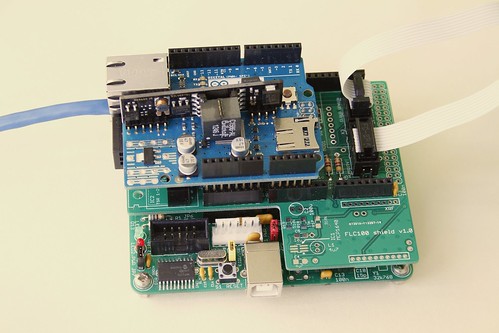
Combined magnetometer and cloud detector
Combined magnetometer and cloud detector.


To improve the performance and stability of the AuroraWatchNet magnetometers I recently began experimenting with a power over ethernet (PoE) version. With restrictions on power consumption lifted considerable performance improvements are possible. As a result I have developed the magnetometer hardware specifically to support a power over ethernet version. Another instrument I've been developing is a cloud detector. This too should benefit from a power over ethernet version. One problem I encountered was with dew settling on the sensor but fitting a heater is incompatible with battery-powered operation. Since both the magnetometer and cloud detector use almost the same hardware I decided to design an Arduino-compatible 'shield' that could be used to support both systems.

Combined magnetometer and cloud detector hardware
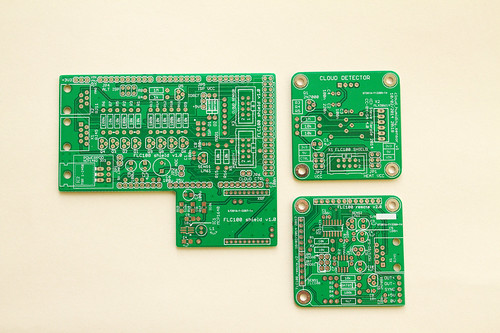
Combined magnetometer and cloud detector PCBs
Printed circuit boards for the sensor shield (left), the IR or humidity sensor (top right)
and fluxgate magnetometer (bottom right). Click for annotated version.
The complete system requires six circuit boards (five for the wireless version). The first is the microcontroller board, I use my Calunium Arduino clone. I hope that in future it will be possible to use an off-the-shelf Arduino Mega2560 instead but the current firmware relies on Calunium's real-time clock to generate the hardware interrupts which control the sampling interval. There is also a sensor shield, the Arduino Ethernet shield (omitted on the battery-powered wireless version), and one board for each of the sensors (fluxgate magnetometer, IR temperature and humidity).

The sensor shield is based on the existing design and retains the option of battery-powered operation with radio communication. The magnetometer sensor and analogue-to-digital converter must be powered at 5V, which requires a level-shifting circuit when the microcontroller is powered from 3.3V, which is the case when operating from batteries. For power over ethernet use the microcontroller must also operate at 5V for compatibility with the Arduino Ethernet shield so the level shifting is not required. It is kept however as it provides buffering between the two circuit boards; 1.5m is a considerable distance for an I2C bus. The cloud detector uses a non-contact infra-red temperature sensor operating at 3.3V so a level-shifting circuit is required for PoE operation where the microcontroller is connected to 5V. (I've ignored the fact that a 5V version of the sensor exists since it isn't readily available in the UK). The sensor shield allows a humidity sensor to be connected so that estimates of the clear sky and cloudy sky temperatures can be made. As before, an on-board LM61 temperature sensor monitors the system temperature. The new sensor shield also adds a header to fit an Embedded Adventures lightning sensor module. I don't have one of these at the moment so I can't be certain it will work and there is no software support for it in the existing firmware. Fitting it at the same time as the cloud detector sensors will require long break-away headers to be soldered to the bottom of the lightning sensor module.
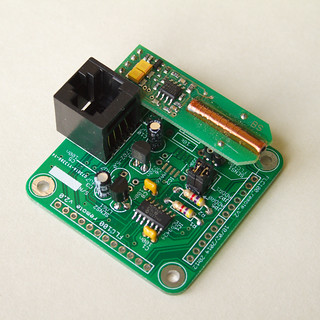
Fluxgate magnetometer sensor PCB
Fluxgate magnetometer sensor mounted on its sensor PCB.
Click for annotated version.

The fluxgate sensor is fitted on its own PCB which contains the analogue to digital converter. For PoE operation a linear voltage regulator is used to convert from 9V to the 5V supply it requires. For battery operation a MAX619 DC-DC charge pump boosts the battery voltage to 5V. Almost all of the temperature variation can be removed by placing the PCB at the bottom of a 1m length of soil pipe. The pipe is buried to a depth of 0.85m with its axis vertical. In the magnetometer-only system the microcontroller, sensor shield and ethernet shield (or batteries for the wireless version) are fitted onto a wooden frame to hold them into the top part of the tube. Positioning the rest of the system away from the fluxgate sensor helps to avoid unwanted effects from any ferro-magnetic components (such as the batteries), it also aids access and enables wireless data transmission.
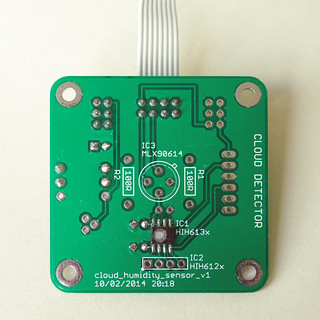
Humidity sensor PCB
Honeywell HIH6131 humidity sensor mounte on its sensor PCB.
The same PCB design is also used for the MLX90614 IR temperature sensor.
Click for annotated version.

The enclosure design used for the magnetometer isn't suitable for the cloud detector so the prototype cloud detector used a standard IP65 rated box, with the IR temperature sensor pointing upwards to view the sky. The humidity sensor was fitted above a breather hole in the bottom of the box. This concept will continue to be used for the cloud detector; the IR temperature sensor and humidity sensor are fitted to separate PCBs in the top and bottom of the box. To minimise costs the IR temperature and humidity sensors use the same PCB design. The mechanical design of the cloud detector part is something I'd like to improve upon, particularly to reduce the number of PCBs used. However the differing sensor requirements may prevent this.

For a combined system I plan to use the soil pipe to house the fluxgate sensor but locate the rest of the electronics in a separate box following the design of the prototype cloud detector.

Does it work?

I've not yet deployed a system outside but testing indicates the new printed circuit boards work as intended when used in power over ethernet mode. Battery-powered operation on this new version has not yet been tested.

Design files

The design files (hardware, firmware and software) are open source and can all be downloaded from the Github repository. A PDF version of the user manual describing how to construct and operate the magnetometer can be downloaded from http://aurorawatch.lancs.ac.uk/manual.pdf. At the time of writing only instructions to build the original FLC100 shield are included. Instructions to build the combined sensor shield described above will be added in due course.


Wednesday, 12 February 2014

Performance comparison of power over ethernet (PoE) and battery magnetometers

Introduction

I've been working to improve the performance and stability of the AuroraWatchNet magnetometers. It's apparent that both measurement noise and stability are considerably improved when the sensor is powered continually. Unfortunately with the sensor powered continually the batteries last for only a few weeks. I have therefore been testing a power over ethernet (PoE) version of the magnetometer. The hardware is essentially the same but the addition of the Arduino Ethernet shield requires the microcontroller to operate from 5V. Operating voltage is easily changed on my Calunium microcontroller board. With the power restrictions lifted the sampling interval can also be reduced. The test system has been operating reliably for almost two months, sampling every 5 seconds. With some minor configuration changes sampling every second is possible although I am not convinced the trade-off in measurement noise is worthwhile.

Performance comparison

Below is a plot comparing one hour of data from the new power over ethernet system with two of the existing battery-powered wireless models already in operation. The PoE system is on the same site as LAN1 but located nearer parked cars. I chose this period because it was free of man-made disturbances. I adjusted the baselines so that the plots overlap.Only the H component of the magnetic field is shown.

Power over ethernet compared with existing AWN magnetometers
Click for larger version.

The graph shows that the power over ethernet version has much smaller measurement errors; it can probably operate with ~0.1nT accuracy compared to ~10nT for the battery-powered version. It's such an improvement that I found the measurement accuracy was being limited by the available resolution of the analogue-to-digital converter. The battery-powered versions derive the sample value from the median of 15 samples (taken as a burst over 4 seconds) to reduce noise. To improve the resolution for the PoE version it operates by taking the mean of 15 samples. Further improvement to the resolution may be possible by taking advantage of the programmable gain amplifier that is built into the analogue-to-digital converter.

Let's see how it compares against some observatory-grade measurements. The plot below shows the same interval but this time uses data from the British Geological Survey magnetometers at Eskdalemuir and Hartland. I obtained the data from the SAMNET data archive at Lancaster University, where the data has already been converted into HEZ magnetic coordinates. AuroraWatchNet also operates with HEZ magnetic coordinates, although usually the E and Z sensors are not present. As before, the baselines have been adjusted so that the plots overlap.


PoE magnetometer compared with BGS magnetometers
Click for larger version.


The similarity between the different traces is striking. Some differences are to be expected since Eskdalemuir is approximately 140km north of Lancaster and Hartland is 350km SSW of Lancaster. This interval is interesting because it shows Pi2 pulsations, starting at about 01:15 and ending around 01:30. The period of the pulsations are about 90 to 120 seconds.

Conclusions

For a home-built citizen-science magnetometer which probably costs 25 times less than its observatory grade cousin I'm very happy with its performance. The detection of Pi2 pulsations means a low-cost magnetometer can now notify of substorm onset, not just the arrival of geomagnetic storms. A network of such devices has interesting possibilities for the study of magnetic field line resonances.

You might wonder why anyone would want to buy an observatory grade instrument, there are good reasons. At present I am relying on the sensor manufacturer's calibration, whilst an observatory grade instrument would be supplied with an official calibration certificate. The observatory instrument would also have better long-term baseline stability, lower temperature variation and higher cadence. Calibration is an issue I hope to tackle at a later date. For space-weather monitoring only short-term variations are of interest and
the better performance provided by an observatory system may not be needed.

Data credits

The Sub-Auroral Magnetometer Network data (SAMNET) is operated by the Space Plasma Environment and Radio Science (SPEARS) group, Department of Physics, Lancaster University. Hartland and Eskdalemuir data is provided courtesy of the British Geological Survey.


Sunday, 27 October 2013

Magnetometer progress report: link indicator LED

I recently added a new feature to the magnetometer remote sensor unit firmware. To help indicate when it is within radio communication range of the base unit an LED is turned on at the start of a message communication. When the sensor unit receives the acknowledgement from the base unit of successful message receipt the LED is switched off. In normal operation the LED should blink briefly every 30 seconds, after each sampling interval. If the LED remains on it indicates a problem with the radio link. For the initial installation the sampling time can be reduced to 5 seconds for to obtain faster feedback of whether communication is successful or not.

Improvements for battery-powered operation

Indicating link errors by using an LED is convenient during installation but the power wasted after installation is not compatible with battery-powered operation. To save power the LED is used only the first 15 minutes of operation. Only user-initiated reset actions (power on or reset switch pressed) cause the LED to be used, resets from by the watchdog timer or brown-out detector are ignored. The cause of the reset is detected by examining the microcontroller's status register (MCUSR).


Communication timeout feature added

I've also added a timeout which detects when communication has been lost for an extended period. The microcontroller system is rebooted in the hope that the error is recoverable. Loss of communication, along with low battery status, can also be sensed and reported by running the latest version of the data plotting software on the Raspberry Pi. If either error is detected a message can be sent via email, Twitter or Facebook.


Saturday, 18 May 2013

An open-access cloud-detection network

Introduction

Living in the North-West of England I find that my attempts to view the aurora or astronomical events such as meteor showers, lunar eclipses and comets are often prevented by cloud. On these occasions I wonder if it is worthwhile driving somewhere to find some clear sky. But where? If only I could look at a map to see where it was clear now. Publicly-available satellite images don't appear to have the resolution needed for this purpose. Maybe I should go to bed instead and wait for an alert when the skies have cleared? Could the question of where and when to find clear skies be answered by an open-access cloud detection network operated by citizen-science volunteers?

Requirements

I've together a draft list of requirements to construct a useful network:

  • Open-access. While my primary concern is with viewing the aurora I can see there are many other uses of such a network. Astronomy and obviously meteorology. Open-access enables other observers to make use of the data for their own purposes.
  • Near real-time. The weather here can quickly change. Ideally measurements should be taken every few minutes and be made available without unnecessary delay.
  • Use open-source hardware (OSHW). More specifically, an OSHW design should exist which allows users to contribute readings with the lowest possible cost.
  • Large geographical coverage. 
  • Night time operation required, day time beneficial.
The most difficult requirement to satisfy is the coverage. With ground-based sensors the viewing area might be as small as 2km diameter (cloud-base 1000m, optical viewing angle ±45°); at this size complete coverage of Great Britain would require over 57000 installations. A useful network does not require complete coverage, for auroral and astronomical purposes good results could be achieved by positioning sensors in a few viewing locations selected for low light pollution.

Remotely-sensing clouds

Perhaps the simplest method to remotely-sense cloud cover is to measure the 'sky' temperature with a non-contact infra-red (IR) thermometer. In the absence of cloud cover this is very low (say -12 to -20°C for Spring in the UK) but with cloud cover the temperature measured is warmer (0 to 4°C). These temperatures vary over the course of the year but by looking at the difference between the sky and ambient ground-level temperatures an estimate of cloud cover is possible. Some of these thermopile sensors have a digital output for interfacing directly with a microcontroller.

A camera and image-recognition software is another approach but it is more complex to develop, install and operate. It is not clear how such a system would perform at night. In order to install the maximum number of sensors I plan to concentrate on cheaper methods.

Design concept

I believe there are two key factors which limit the number of sensors in the network: cost and ease of installation. To minimise the infrastructure I plan to begin with a battery-powered unit which communicates with a Raspberry Pi (or other computer) via a low-cost, licence-free radio module. This is the same concept used by the AuroraWatchNet magnetometer sensors.


Potential problems

Precipitation (rain, snow, hail) and dew on the sensor will prevent accurate sky temperature measurements, most likely indicating cloud when it may in fact be clear. A heater to prevent dew forming is an option but the temperature gradients may cause the thermopile to give incorrect measurements. The power consumption needed is incompatible with battery operation. It may be possible to point the sensor downwards, to avoid precipitation and dew, and use a reflective metal surface to observe the sky. Tests shows the sky temperature readings are partially compromised by this approach.


Sensor

I have found a number of sensors which may be suitable:
  • Melexis MLX90614. This sensor contains thermopiles for sensing both the object and ambient temperature. An SMBus interface enables direct connection to a microcontroller. It is packaged in a TO-39 metal can. The standard 3.3V operation, 90° field of view (FOV) variant is readily available in single quantities from UK hobby electronics stores for around £15 each. Other variants exist for 5V operation and with different fields of view (10°, 35°, and a dual 70° FOV). The minimum object temperature is -70°C. The only irritation is that the sleep mode requirements are not compatible with low-power operation on a I2C bus.
  • Melexis MLX90615. Similar to the MLX90614 but the sleep mode requirements are compatible with low-power operation on an I2C bus. Cost is similar to MLX90614 but no UK supplier exists. Package is a TO-46 metal can. Limited to 3.3V operation and a single FOV (80° or 100° variants). The minimum object temperature is -40°C.
  • Texas Instruments TMP006. Small thermopile with I2C interface for direct connection to a microcontroller. Ball-grid array package. Readily available from UK suppliers. Cost is around £3 each for single quantities.
  • Thermometrics ZTP-135SR. Thermopile with analogue output in a TO-46 package, with a thermistor for ambient temperature measurement. Being an analogue output additional processing is required. Around £10 from Farnell.
  • Devantech TPA81. Linear array of 8 thermopiles. Cost is around £65.
  • Panasonic AMG88 Grid-EYE. An 8×8 imaging sensor in a surface-mount package. The minimum object temperature is -40°C. Available from Digikey for around $40.
For the prototype system I plan to use the Melexis MLX90614 sensor. It should be possible to work around the problems with low-power operation by using software I2C and powering the sensor from a logic output, allowing power to be completely removed when not in use.

I excluded the TMP006 because the BGA package is hard to work with; not only is it difficult to solder it will require some kind of enclosure or window to protect it from moisture. Only a few materials are transparent to long-wave infra-red emissions and the better ones are toxic, water-soluble or expensive. The other sensors may be suitable but are more expensive. The TPA-81 linear array and Grid-EYE imaging sensor could provide spatial discrimination and thus distinguish between a thin layer of complete cloud cover and denser clouds with open areas of sky.

Initial results

Initial tests with the Melexis MLX90614 sensor confirm the concept is viable. I have not noticed any ill-effects from the sun within the field of view, suggesting that daytime operation is possible. Further work is required to package the system into a usable prototype which can be deployed outside permanently. Full-time operation will indicate the frequency of measurement errors from dew and precipitation.

Other work

It would be wrong to suggest I am the first to make measurements of cloud cover in this way, useful links are listed below. I am not aware of any existing cloud detection networks.

Useful code for interfacing the MLX90614 IR thermometer with an Arduino. This code works with my Calunium Arduino clone.

Good background information.

http://kcotar.org/arduino-weather-station-1/
A weather station which uses the Melexis MLX90614 sensor for cloud detection.

http://www.noao.edu/staff/gillespie/projects/cloud-detector.html
Similar in concept but using a Peltier device (in reverse) to measure the difference between ambient ground temperature and sky temperature.


Tuesday, 12 March 2013

How to use the GPIO version of avrdude on the Raspberry Pi

Introduction

I previously showed an implementation of a AVR ISP programmer using the Raspberry Pi GPIO port which can be used to program Atmel's AVR range of microcontrollers with avrdude. An ISP programmer based on this design was incorporated into a shield to interface to the RFM12B radio module. This post explains how to use avrdude to actually program devices.

Software installation

Download the patched version of avrdude from http://project-downloads.drogon.net/files/. I also keep a copy in the RPi_RFM12B_ISP respository, https://github.com/stevemarple/RPi_RFM12B_ISP/tree/master/software/avrdude. You will probably want the armhf (hardware floating-point) version. Download the documentation package for avrdude too. Install the packages using "dpkg -i". For example

sudo dpkg -i avrdude_5.10-4_armhf.deb
sudo dpkg -i avrdude-doc_5.10-4_all.deb

Using avrdude over the GPIO interface is problematic for users other than root. The easiest solution is to give the avrdude binary setgroup permission:
sudo chmod g+s /usr/bin/avrdude

Usage

Selecting the GPIO programmer is simply a matter of including "-P gpio -c gpio" options; the -P option specifies that the GPIO port is used (as opposed to USB, serial or parallel interfaces) whilst the -c option selects the correct programmer type on that port.

For example, to check the signature on an ATmega328P execute the command
avrdude -P gpio -c gpio -p atmega328p

To read the fuses execute the command
avrdude -P gpio -c gpio -p atmega328 -U lfuse:r:-:h -U hfuse:r:-:h -U efuse:r:-:h

Customisation

The packages above define a single programmer called gpio which uses the gpio interface on GPIO pins 8 to 11. Since the RFM12B shield for Raspberry Pi implements two independent programmers I prefer to use gpio0 and gpio1. You can add these by creating a .avrduderc file in your home directory. The file should contain:

programmer
  id    = "gpio0";
  desc  = "Use sysfs interface to bitbang GPIO lines";
  type  = gpio;
  reset = 8;
  sck   = 11;
  mosi  = 10;
  miso  = 9;
;

programmer
  id    = "gpio1";
  desc  = "Use sysfs interface to bitbang GPIO lines";
  type  = gpio;
  reset = 7;
  sck   = 11;
  mosi  = 10;
  miso  = 9;
;

Sunday, 10 February 2013

The importance of brown-out detection

The batteries expired in one of the AuroraWatchNet test magnetometers this week. I was expecting that to happen since the magnetometer wasn't operating in its low-power mode and the battery voltage from the two 1.5V alkaline cells had been hovering around 2V for some time. The Atmel ATmega1284P microcontroller is actually powered at 3.3V using a boost power supply. What I didn't expect was for the system to not start after replacing the battery. I could tell xboot was working since the LED flashed 3 times as usual after the reset button was pressed. After that the LED stayed on but nothing else happened, not even the start-up debug messages from the serial port. I guessed the flash program memory had somehow got corrupted.

I used the AVR Dragon to extract the contents of the flash memory (avrdude -P usb -c dragon_jtag -p atmega1284p -U flash:r:flash.img:r) and compared it against the saved raw image file using the linux split and cmp commands. Sure enough, three pages of flash memory were set to 0xFF, probably from some erroneous page clear operation. Brown-out detection was disabled by the fuse settings to save power. Big mistake! What I think happened was as the voltage dipped below its valid range the microcontroller started executing random commands, including 3 SPM page clears, one of which was the first page of flash which holds the interrupt vector table. Valid execution was doomed.

What I should have done was to enable brown-out detection in the fuses, 2.7V seems the most appropriate setting for an 8MHz clock and 3.3V operation. To save power during sleeping the brown-out detection can be disabled with a call to sleep_bod_disable(). Lesson learned!

Saturday, 9 February 2013

Calunium: version 2.1

Calunium v2.1
Calunium v2.1.
Click on the image for an annotated version.

This upgrade to Calunium v2 provides several minor improvements. There is the option to fit a Microchip MCP220 UART-USB converter instead of the FTDI connector. For development purposes the MCP2200 is much more convenient than an external FTDI cable or adaptor; operation at both 3.3V and 5V is supported. For low-power battery operation the MCP2200 uses too much power so the FTDI connector option has been retained.

I find I operate Calunium almost exclusively at 3.3V. I've not been able to find any real-time clocks in a dual-in-line package that operate at 3.3V and feature battery-backup. Suitable clocks are supplied in a SOIC or smaller package. I have therefore removed the DIP footprint option for the real-time clock. The space saved has allowed me to add optional load capacitors for the crystal so that a MicroChip MCP7941x real-time clock can be used. This clock has several benefits over the popular DS1307 (or its 3.3V equivalent, the DS1338). It is cheaper, it can compensate for crystal frequency errors, it has EEPROM storage, two alarms and it also has a unique identifier. This change goes against one of the original aims of Calunium, to use through-hole components to keep it accessible to the widest possible audience. However, considering the other interesting on-board peripherals (micro-SD socket, RFM12B and MCP2200) require surface-mount soldering skills I thought this a reasonable compromise to make. The original through-hole only designs are still available for those who really do not want to use any surface-mount components.

The final improvement is that the SPI clock signal is now routed with a ground plane between it and the real-time clock crystal.

For the full list of features please see the original Calunium v2 blog post.

Calunium v2 and v2.1 PCBs
Calunium v2 (top) and v2.1 (bottom) PCBs.
Click on the image for an annotated version.

Friday, 8 February 2013

RFM12B shield for Raspberry Pi

RFM12B and Atmel ISP programmer shield for Raspberry Pi
RFM12B shield for Raspberry Pi, with integrated in-circuit serial programmer.
Click on the image for an annotated version. 

I recently described the preliminary design of a RFM12B shield for the Raspberry Pi, which used an Atmel ATmega328 to interface between the Raspberry Pi's UART and the RFM12B's SPI interface. The design also included a buffered two-channel in-circuit serial programmer (ISP) using the Raspberry Pi's general purpose I/O. The first channel is for programming the on-board ATmega328 whilst the second channel can program external microcontrollers.

The boards have now been manufactured and the first one assembled and tested. The interface to the RFM12B and the built-in AVR ISP programmer both work as designed. I have been using the Arduino environment to compile and upload the firmware to the ATmega328. The microcontroller pin mapping is identical to the Arduino Uno although the activity LED is wired to D9 since D13 is normally in use by the SPI interface. The ATmega328 operates at 3.3V and is clocked by the internal 8MHz RC oscillator. No bootloader is needed. The Github repository contains boards.txt and programmers.txt files for use with the Arduino IDE, the standard Arduino core is used.

I have been using the first board to replace a Ciseco URF radio module. The firmware for the ATmega328 incorporates my transparent serial emulation layer. This provides a Stream object to which data can be read, and written (or printed), in just the same way as HardwareSerial and SoftwareSerial objects. The same emulation layer can then be used on remote Calunium, Arduino or JeeNode boards to provide a bi-directional data stream, allowing the user to interface to the RFM12B as easily as an XRF or XBee radio module. The emulation layer transparently uses acknowledgements and retries to provide a robust channel, which is an improvement over the Ciseco XRF and URF radio modules. Alternative firmware for the RFM12B shield is easily uploaded to provide different functionality.

ISP programmer

The avrdude configuration file contains details for two GPIO programmers; gpio0 is connected to the on-board ATmega328 and gpio1 is for programming external microcontrollers. By fitting a jumper to the JP1 header the external microcontroller can be powered from the Raspberry Pi's 3.3V supply. Be sure to observe the maximum current rating for the 3.3V supply and never fit the jumper if the remote microcontroller is self-powered. The 74LVC244 buffer ensures that MCUs operating at 5V can be safely connected. Typically the high output level from the 74LVC244 buffer will be recognised as a high but it doesn't meet the worst-case specifications when the external MCU is powered from 5V.

Open source

The Eagle PCB design files for the RFM12B/ISP shield for Raspberry Pi are available on Github and are licensed under the Creative Commons Attribution-ShareAlike 3.0 Unported License. The RF12 transparent serial emulation layer is also available on Github and is released under the MIT license.

Errata

There is a connection missing on the schematic from the drain of FET Q2 to pin 5 (/RESET) on the external ISP header (X3). This connection is also missing from the PCB but can be easily fixed with a direct wire connection on the underside of the board.

Update

I've added a description of how to install and use the patched version of avrdude, http://blog.stevemarple.co.uk/2013/03/how-to-use-gpio-version-of-avrdude-on.html.

Wednesday, 30 January 2013

Transparent serial emulation for the RFM12B radio module

Introduction

For the AuroraWatchNet magnetometers that I am developing I currently use the Ciseo XRF radio module. They are based upon the pseudo-standard XBee footprint, operate at 3.3V and provide a UART interface to the microcontroller. They are easy to use but I have found the range is not always sufficient, typically limited to 60 metres of free space plus one exterior wall/window. Another commonly-used radio module is the HopeRF RFM12B transceiver, as used on the JeeNode. The RFM12B also operates at 3.3V but features an SPI interface to the microcontroller. It is available as a 2mm pitch surface-mount module, or as a 12 pin 2mm pitch DIP package.

As my Calunium v2 microcontroller development board can be fitted with a RFM12B radio module I naturally wanted to compare the performance of the RFM12B and XRF. Initial testing of the Hope RFM12B gave a usable range of 150 metres of free space after transmission through one exterior wall/window. Some of the additional range is due to using the 433MHz version of the RFM12B compared to the 868MHz operating frequency that the XRF defaults to. The range measurements were not very scientific and further work is required before meaningful conclusions can be drawn regarding the comparative ranges. However these initial results have encouraged me to investigate replacing the XRF by the RFM12B, particularly as it is both cheaper and uses less power. A comparison of the basic specifications can be found at http://blog.homelabs.org.uk/wireless-connectivity/.

As I have already deployed a few magnetometers using the Ciseco XRF module I would like to to use the RFM12B as a serial device. This would enable the existing firmware to be used with minimal changes. It would also allow the possibility of having a single firmware support both XRF and RFM12B modules.

Serial emulation

I have created a serial emulation layer for the RFM12B by deriving a class (RF12_Stream) from the Arduino Stream class. Text or binary data can then be read from or written to the RFM12B in exactly the same way as the standard Serial port. Since it is a Stream object the Streaming class (which overloads the >> and << operators) can also be used with RF12_Stream. The RF12_Stream class automatically breaks up the data to be transmitted into short packets which are sent using the Jeelab RF12 library. ACKs and retransmissions are employed to prevent losing data from dropped packets. A packet number is included to prevent duplicated data, which could otherwise occur for the case when the ACK is not received and a packet is retransmitted. The class keeps track of the number of packets sent and received, and the number of retransmissions, data which may be useful to identify the optimal channel on which to operate.

The begin() function takes different parameters to Serial.begin() and it returns a logical value to indicate whether the RFM12B has been found on the system. The user is required to call the poll() function periodically so that outgoing packets are sent and received packets processed. These are the only differences compared to sending data to the standard Arduino Serial port.

Source code for the RF12_Serial emulation can be found on Github, https://github.com/stevemarple/RF12_Stream; it is released under the MIT license. An example sketch is included which echoes data between the Arduino serial port and the RFM12B. When compiled for the ATtiny84 this sketch is less than 8kB so I am hopeful it can be used on the RFM12B to Raspberry Pi expansion board designed by Martin Harizanov. AsyncDelay, https://github.com/stevemarple/AsyncDelay, and CircBuffer, https://github.com/stevemarple/CircBuffer, are also required.

Calunium uses INT2 for the interrupt from the RFM12B which is not supported by the JeeLabs version of the RF12 library so I am currently using a modified version. Source for this version is also available on Github, https://github.com/stevemarple/RF12. It is intended that RF12_Serial should work with both the original RF12 library and my version.

Single firmware to support RFM12B and XRF

By utilising the return value from the RF_Stream begin() function it becomes trivial to produce a single firmware which can support either the RFM12B or XRF radio modules. The trick is to create a Stream reference which is set to either Serial (for the XRF) or to rfm12b. The RFM12B_autoselect example sketch illustrates this concept.

How does it differ from RF12sio?

The RF12sio library overloads the << and >> operators so that packets can be constructed and processed easily. The user is still responsible splitting the data into packets. RF12sio is not derived from Stream so it is not possible to use the Stream pointer trick shown in the RFM12B_autoselect sketch.

Credits

Thanks to JeeLabs and JC Wippler for the RF12 library and to Arduino for the standard Arduino libraries.

Thursday, 24 January 2013

How to use the Atmel ATmega1284 (non-P version) with tools that don't support it

I found out by accident there is now an Atmel ATmega1284 microcontroller, as well as the older ATmega1284P. The first I knew was when I tried to upload the bootloader and avrdude warned of a signature mismatch:

avrdude: Device signature = 0x1e9706
avrdude: Expected signature for ATMEGA1284P is 1E 97 05
              Double check chip, or use -F to override this check

Correcting the device didn't help, avrdude doesn't recognise the ATmega1284. That could be fixed easily by creating a custom entry in $HOME/.avrduderc. I didn't bother with that since avr-gcc doesn't support the ATmega1284. At this point I was slightly worried as I had ordered a large quantity of ATmega1284 instead of the ATmega1284P.

A work-around

Fortunately there is a work-around. The two microcontrollers are essentially identically except for some small electrical differences relating to power usage and the last signature byte. Therefore code compiled for the ATmega1284P will run on the ATmega1284. If you are using avrdude to upload just add the -F command line option to force the signature check to pass.

If you use the xboot bootloader you should have no further problems after installing the bootloader since xboot doesn't check the signature bytes. Users of the Optiboot bootloader are probably not so fortunate; I believe the signature is checked - I haven't tested it since I'm now using xboot on all of my Calunium development boards.

Thursday, 10 January 2013

UART-USB converter for mixed 3.3V/5V operation


For some future projects I have in mind I would like to add a USB interface to my Calunium development board, rather than using the Sparkfun FTDI basic breakout board that I have been using. One of the key features is that it should work seamlessly with the jumper-selectable 3.3V or 5V operation offered by Calunium v2, which is most easily accomplished by a self-powered design; auto-reset is a bonus.

Microchip offer the MCP2200 USB interface in a choice of packages including a 20 pin SOIC package which is very convenient for home assembly of PCBs. I found conflicting information about the MCP2200 so I prototyped the above circuit to check that mixed 3.3V/5V operation was ok. VUSB (pin 17) is permanently connected to 3.3V so that the USB signalling levels are always correct. The VDD supply pin is connected to IOREF on my Calunium board, which is either 3.3V or 5V, depending on the position of the voltage selection jumper, ensuring that the logic levels for the MCP2200 match those used by the microcontroller. I also wanted to test whether the MCP2200 would auto-reset the microcontroller. The MCP2200 doesn't have a DTR output pin which is how modern Arduinos reset the microcontroller for uploading a new sketch. Fortunately the MCP2200 does have an RTS output, and as that was the method used by older Arduinos I connected that to /RESET via a 100nF capacitor.

After building the circuit and connecting it to my Ubuntu 10.04 Linux computer the MCP2200 was immediately recognised, I used the dmesg command to see this. Ubuntu automatically created the /dev/ttyACM0 device file, no configuration changes were needed at all. Using gtkterm I was able to toggle the state of the RTS pin. I then hooked up the circuit to one of my Calunium microcontroller boards and was able to upload sketches without needing to press the reset button, in both 3.3V and 5V operation modes. I haven't tested this from Windows but from what I've read on the Microchip forum I suspect it won't work due to deficiencies in the Windows driver.

The datasheet suggests that a ceramic resonator can be used instead of the crystal and load capacitors. I found it did work even though the resonator's frequency tolerance was 0.5%, not 0.25% as required by the USB specification. As I can't source any resonators which meet the specification I'll be using a 12MHz crystal.

The MCP2200 wasn't my first choice; the obvious part was the FTDI FT232RL, although I had reservations about working with an SSOP package. Further investigation revealed that 3.3V operation requires an external crystal, but to use one isn't straightforward. On first use the FT232RL must be powered from >= 4.0V and a custom utility (not openly supplied?) is needed to select the external crystal. The standard MPROG utility cannot be used for this. I am aware that the FT232RL could be powered from the USB 5V supply but I am not a big fan of powering devices simultaneously from both internal and external supplies. One of the future projects is to replace hardware which is powered from multiple sources and is very susceptible to damage from being powered up/down incorrectly.

In conclusion, this is a very useful USB converter for Linux users and for final designs. Windows users who wish to regularly upload new firmware via a bootloader may find it less useful.


Friday, 28 December 2012

Calunium: version 2

Calunium v2
Calunium version 2. Click on the image for an annotated version.

Features

  • ATmega1284P microcontroller with 128 KBytes flash memory, 16 KBytes SRAM and 4 KBytes EEPROM, SPI and I2C buses and 2 UARTS.
  • Shield-compatible with Arduino Uno revision 3, with extra I/O laid out to be compatible with Arduino Mega pins. Pin mapping is chosen for maximum compatibility with Uno.
  • Jumper-selectable 3.3 V or 5 V operation; selected voltage is available at the IOREF pin to enable shields to operate at the correct voltage.
  • I2C (SDA/SCL) mapped to dedicated SDA/SCL pins and the standard location used by the Arduino Mega but jumpers can be used to replace A4/A5 with SDA/SCL signals for compatibility with older Arduino shields.
  • Second UART (D1, D2) signals also mapped to corresponding location on Arduino Mega (TX1, RX1).
  • ISP header in standard location, allowing the Arduino ethernet/SD shield to be used.
  • D13 LED connected via FET to avoid loading D13.
  • Real-time clock (e.g, DS1307, DS1338, MCP7941x). Output square wave can be routed to D6 (INT2) or D15 (TOSC1, for input to timer/counter 2). Battery backup from CR2032 battery.
  • Micro-SD socket for additional data storage. Uses SPI bus (D11, D12, D13), chip select is D22. If card is fitted then 3.3 V operation is required.
  • Hope RFM12B radio module for communication. Uses SPI bus (D11, D12, D13), chip select is D14 and interrupt request is D6 (INT2, can be disconnected by removing a jumper). Requires 3.3 V operation; Calunium can be powered from 5 V provided that the RFM12B is not used.
  • Power from USB or FTDI connector.
  • Switches, connectors and USB socket located outside of the standard Arduino shield footprint so they do not interfere with shields and are accessible when shields are fitted.
  • Auxiliary power connector; connect your own voltage regulator or boost converter. 5 V from USB (FTDI and/or USB connector) and 3 V from RTC battery also available on the connector. For easy prototyping add your own power adaptor.
  • Auto-reset can be disabled by removing jumper.
  • Pads to fit LM61 temperature sensor.
  • Usable PCB-mounting holes.
  • JTAG header for debugging/programming.

Bootloader

Either the Optiboot or xboot bootloaders can be used. My preference is for xboot as explained in a previous blog post.

About the name

As Arduino is an Italian project, this project takes its name from the Roman name for Lancaster, Calunium, where the design of this clone originates.

Open source

Hardware
The Eagle PCB design files for Calunium are available on Github and are licensed under the Creative Commons Attribution-ShareAlike 3.0 Unported License.

Software
Files to allow Calunium to be used with the Arduino 1.0 IDE are available on  Github and are licensed under the Gnu General Public License v2.

Peripherals pin mapping

PeripheralPinFunction
LED13
Temperature sensorA6
A7
Power
Output
Real-time clock*D6/D15Square-wave output/alarm
microSD card22Card select
RFM12B radio module6
14
Interrupt request
Select
* Also uses I2C bus (20, 21).
** Also uses SPI bus (11, 12, 13).

Microcontroller pin mapping

PinArduino Uno (Atmega328P)Calunium (Atmega1284P)Arduino Mega2560 (ATmega2560)
D0PD0 (PCINT16/RXD)PD0 (PCINT24/RXD0/T3)PE0 (RXD0/PCINT8)
D1PD1 (PCINT17/TXD)PD1 (PCINT25/TXD0)PE1 (TXD0)
D2PD2 (PCINT18/INT0)PD2 (PCINT26/RXD1/INT0)PE4 (OC3B/INT4)
D3PD3 (PCINT19/OC2B/INT1)PD3 (PCINT27/TXD1/INT1)PE5 (OC3C/INT5)
D4PD4 (PCINT20/XCK/T0)PB0 (PCINT8/XCK0/T0)PG5 (OC0B)
D5PD5 (PCINT21/OC0B/T1)PB1 (PCINT9/CLKO/T1)PE3 (OC3A)
D6PD6 (PCINT22/OC0A/AIN0)PB2 (PCINT10/INT2/AIN0)PH3 (OC4A)
D7PD7 (PCINT23/AIN1)PB3 (PCINT11/OC0A/AIN1)PH4 (OC4B)
D8PB0 (PCINT0/CLKO/ICP1)PD6 (PCINT30/OC2B/ICP)PH5 (OC4C)
D9PB1 (OC1A/PCINT1)PD5 (PCINT29/OC1A)PH6 (OC2B)
D10PB2 (SS/OC1B/PCINT2)PB4 (PCINT12/OC0B/SS)PB4 (OC2A/PCINT4)
D11PB3 (MOSI/OC2A/PCINT3)PB5 (PCINT13/ICP3/MOSI)PB5 (OC1A/PCINT5)
D12PB4 (MISO/PCINT4)PB6 (PCINT14/OC3A/MISO)PB6 (OC1B/PCINT6)
D13PB5 (SCK/PCINT5)PB7 (PCINT15/OC3B/SCK)PB7 (OC0A/PCINT7)
D14-PC7 (TOSC2/PCINT23)PJ1 (TXD3/PCINT10)
D15-PC6 (TOSC1/PCINT22)PJ0 (RXD3/PCINT9)
D16-PC5 (TDI/PCINT21)PH1 (TXD2)
D17-PC4 (TDO/PCINT20)PH0 (RXD2)
D18-PC3 (TMS/PCINT19)PD3 (TXD1/INT3)
D19-PC2 (TCK/PCINT18)PD2 (RXD1/INT2)
D20-PC1 (SDA/PCINT17)PD1 (SDA/INT1)
D21-PC0 (SCL/PCINT16)PD0 (SCL/INT0)
D22-PD4 (PCINT28/XCK1/OC1B)
D23-PD7 (OC2A/PCINT31)
A0PC0 (ADC0/PCINT8)PA7 (ADC1/PCINT7)PF0 (ADC0)
A1PC1 (ADC1/PCINT9)PA6 (ADC0/PCINT6)PF1 (ADC1)
A2PC2 (ADC2/PCINT10)PA5 (ADC2/PCINT5)PF2 (ADC2)
A3PC3 (ADC3/PCINT11)PA4 (ADC3/PCINT4)PF3 (ADC3)
A4PC4 (ADC4/PCINT12)PA3 (ADC4/PCINT3)PF4 (ADC4/TCK)
A5PC5 (ADC5/PCINT13)PA2 (ADC5/PCINT2)PF5 (ADC5/TMS)
A6PC6 (ADC6/PCINT14)PA1 (ADC6/PCINT1)PF6 (ADC6/TDO)
A7PC7 (ADC7/PCINT15)PA0 (ADC7/PCINT0)PF7 (ADC7/TDI)

Bill of materials

A bill of materials for Calunium v2 is available from Google docs.

Changes from Calunium v1

Summary of changes from Calunium v1.

Arduino 1.0 headers included
The revised Arduino headers have been included. This adds dedicated I2C connections and an IOREF pin whose purpose is to indicate the I/O voltage level.

Jumper-selectable 3.3 V or 5 V operation
The microcontroller supply voltage is easily selected by a single jumper setting.

Improved reset circuit
A reversed-biased diode has been added in parallel with the reset pull-up resistor to prevent overshoot of the reset signal which can cause erroneous behaviour.

Option to use surface-mount real-time clock
I've not been able to find a suitable alternative to the DS1307 which can operate at 3.3 V and which is available in a dual inline package. The alternatives are only available in SOIC8 or smaller packages. To support 3.3 V operation a combined DIP/SOIC8 footprint has been used.

Ceramic resonator option instead of crystal
The crystal footprint has been revised to allow a 3-pin ceramic oscillator to be fitted as an alternative to a crystal. Omit the 22 pF loading capacitors when using a ceramic oscillator.

Improved analogue power supply circuitry
Analogue power supply follows the advice given in the data sheet.

Temperature sensor now powered from logic output
The optional LM61 (or similar) temperature sensor is now powered from D7. This change has been made for low power operation; I had been fitting an LM61 to other shields instead of using one on Calunium so that it can be powered off when not needed.

V-USB removed
I've had no success with the V-USB interface so the necessary circuitry has been removed. If you have had any success please let me know how to make it work! The USB connector remains as a convenient 5 V power connector.

Monday, 19 November 2012

Using Xboot with Calunium

Xboot is a bootloader for Atmel ATmega and Xmega microcontrollers and can be used as an alternative to the popular Optiboot. It's not quite as small as optiboot (4KB compared to 2KB) but it does offer one very useful advantage - it has an API which enables flash reprogramming by the application. Compiling the bootloader is mostly straightforward, follow the instructions included with Xboot. There are two additional points to watch. Make sure you copy the desired configuration file from the conf directory to the xboot directory. You may need to set the shell to bash when invoking make; I did this with the following command:

make SHELL=bash calunium_12MHz.conf.mk

The original source is available from Github, my fork contains configuration files for Calunium.

Using xboot with avrdude is easy, just be sure to select the avr109 bootloader protocol. You can also program from the Arduino IDE. You will need an entry in boards.txt like:

cal1284p_xboot_12.name=Calunium 1284P (PCB, 12MHz, XBoot, 115200 baud)
cal1284p_xboot_12.upload.protocol=avr109
cal1284p_xboot_12.upload.maximum_size=126976
cal1284p_xboot_12.upload.speed=115200
cal1284p_xboot_12.bootloader.low_fuses=0xFF
cal1284p_xboot_12.bootloader.high_fuses=0x92
cal1284p_xboot_12.bootloader.extended_fuses=0xFF
cal1284p_xboot_12.bootloader.path=xboot
cal1284p_xboot_12.bootloader.file=calunium_12MHz.hex
cal1284p_xboot_12.bootloader.unlock_bits=0x3F
cal1284p_xboot_12.bootloader.lock_bits=0x0F
cal1284p_xboot_12.build.mcu=atmega1284p
cal1284p_xboot_12.build.f_cpu=12000000L
cal1284p_xboot_12.build.core=arduino
cal1284p_xboot_12.build.variant=pcb

Application firmware updates


A security feature of the Atmel ATmega and Xmega processors is that an application cannot modify the flash program memory, only code executing from within the bootloader program space is permitted to do so. By compiling xboot with ENABLE_API set to yes the bootloader will export functions which can write to a temporary storage area located in the upper half of the user firmware area. The application can then call these bootloader functions to write a new firmware image to this temporary area of flash memory. On reboot xboot will copy the temporary firmware image to its correct location and then execute it. The process includes a cyclic redundancy check to prevent against writing corrupted firmware images. This approach is robust since flash reprogramming does not occur until the MCU has downloaded all of the new firmware. The disadvantage is that only half of the application space is available for the actual application; with the ATmega1284P this may not be a major problem.

I'm using the firmware update API to allow over-the-air updates to my AuroraWatchNet magnetometer and it works perfectly. The new firmware is copied in blocks of 128 bytes inside a message which has been signed with a HMAC-MD5 authentication code. After each second block has been received the 256 bytes are copied to one page in the temporary flash area. I'll probably add an option to perform firmware updates from the microSD card which is included on Calunium v2.

The only important points to note are that the CRC passed to xboot must be the one computed from the firmware image sent (not the one received!), and that xboot calculates the CRC over the entire temporary area. If the new image is smaller than the temporary area you'll need to erase the temporary area before copying so that the remaining space is in a known state. Unprogrammed bytes will be 0xFF. Be sure to calculate the CRC including the effect of these unprogrammed bytes otherwise the CRC xboot calculates will not match and it won't copy the firmware.

Bootloader of choice


I'm really pleased with how well xboot seems to work and I like how easy it is to add new configurations. I've just started using it with the internal RC oscillator running uncalibrated; I had to reduced the baud rate to 38400 where the frequency error is much less (see datasheet). Based on my experience so far this is definitely my recommended bootloader for the ATmega1284P.


Sunday, 15 July 2012

AVR/Arduino ISP programmer using the Raspberry Pi GPIOs

Atmel ISP programming from Raspberry Pi GPIO
ISP programming of Calunium Arduino clone using Raspberry Pi GPIO. Click on the image for an annotated version.

Introduction

As a fully-featured Linux computer there are many external programmers that can be used with your Raspberry Pi to program the Atmel AVR range of microprocessors. It's also possible to use the general purpose input/output lines (GPIOs) found on the Raspberry Pi to implement an ISP programmer with minimal extra hardware. I say "with minimal extra hardware" because although it can be done with no extra hardware I recommend adding a buffer and FET to protect the Raspberry Pi. You might reasonably wonder what is the point if extra hardware should be used since external USB programmers can be bought cheaply from Ebay. However, if you are going to add an extension PCB to your Raspberry Pi anyway, for instance to communicate with a remote Atmel processor, then including an ISP programmer makes sense and adds very little cost.

AVR ISP programming interface

Most of the Atmel AVR range can be programmed using an ISP interface which resembles the SPI bus. For this description I'll assume that the SPI pins are reused for this purpose but you should check the datasheet to make sure this is true for your part. The RESET pin is used as the active-low chip select pin, SCK is the clock signal, MOSI is the input data pin and MISO is the output data pin. If the directions seem odd remember that the microcontroller is acting as a SPI slave in this scenario; with that in mind the names make perfect sense. The ISP programmer then communicates with the microcontroller, sending commands to read or write flash memory, EEPROM, fuses, and/or locks. Avrdude supports many different programmers which can be used for this task.

Raspberry Pi ISP programmer hardware

The simplest interface on the Raspberry Pi is to use four GPIO pins and bit-bang the SPI commands. I don't recommend this however. After programming has finished the SPI interface on the microcontroller could revert to master mode where SCK and MOSI become outputs. Connecting two logic outputs together which could be at opposite logic levels is not wise. For a safer interface I used the circuit below.


AVR ISP Programmer for Raspberry Pi
Schematic diagram of ISP programmer. Also available as full-size image, Eagle schematic or PDF.


On the target microcontroller the RESET signal is typically connected to a 10 kΩ pull-up resistor, often with a reset switch pulling to ground. The 2N7000 FET provides an open-drain interface which safely connects the Pi to RESET, even if the reset switch is pressed whilst the programmer is connected. Compare this to the case of directly wiring a Raspberry Pi GPIO; pressing the reset switch could short a high-level output directly to ground. Ouch. The 100 kΩ pull-down resistor connected to the gate of the FET ensures it is normally off (and thus RESET is high) when the reset GPIO pin is an input, such as after programming. The 100 kΩ resistor connected to RESET acts as a weak pull-up in case no pull-up resistor is connected to the microcontroller (e.g., for easy programming on a solderless breadboard). In the circuit above a jumper can be fitted to power the target microcontroller from the 3.3 V supply on the Raspberry Pi (care, maximum current 50 mA).

To protect the remaining Raspberry Pi GPIOs I have used a 74LVC244 buffer. The active-low OE (output enable) allows the outputs to be disconnected when the microcontroller is not held in its reset state. I chose this part because it operates at 3.3 V but safely tolerates 5 V on its inputs, and also 5 V applied to the outputs when they are in the high-impedance state.

The open-drain FET inverts the state of its input. In theory it should be possible to configure avrdude to account for this but I could not make it work with the patched GPIO support so I used a spare gate in the 74LVC244 to form a logic inverter. The circuit described above should be safe to use even if the target system operates at 5V (but don't fit the shunt to the jumper). I've not tested it, so make your own judgement! You should also note what whilst it should be safe, it isn't guaranteed to be reliable; typically the high output level from the 74LVC244 buffer will be recognised as a high but it doesn't meet the worst-case specifications.

GPIO pin mapping


SignalGPIOP1 header pin number
RESET8P1-24
SCK11P1-23
MOSI10P1-19
MISO9P1-21

Although the SPI has been implemented by bit-banging the pins chosen are the SPI pins on the Raspberry Pi P1 header.

Credits

Gordon Henderson for providing the patched avrdude compiled for the Raspberry Pi, see http://project-downloads.drogon.net/files/.

Radoslav Kolev who submitted the patch to add linux GPIO to avrdude.


Update

This design has been incorporated into my RFM12B shield for Raspberry Pi which contains a two-channel AVR ISP programmer. One channel is used to flash both the on-board ATmega328P, the other channel can be used to program external devices.

I've added a description of how to install and use the patched version of avrdude, http://blog.stevemarple.co.uk/2013/03/how-to-use-gpio-version-of-avrdude-on.html.

Monday, 18 June 2012

Calunium v2.0: Preliminary design

View schematic and PCB as PDF.

Preliminary version

I'm planning to release an improved version of Calunium, my Arduino clone. Before finalising my design I'd like to have some feedback from other ATmega1284 users and would-be users. I make no promises that your suggestions will be included but I value any constructive feedback you give.

Summary of changes


Arduino 1.0 headers included

The revised Arduino headers have been included. This adds dedicated I2C connections and an IOREF pin whose purpose is to indicate the I/O voltage level.

Jumper-selectable 3.3V or 5V operation

The microcontroller supply voltage is easily selected by a single jumper setting.

Improved reset circuit

A reversed-biased diode has been added in parallel with the reset pull-up resistor to prevent overshoot of the reset signal which can cause erroneous behaviour.

Option to use surface-mount real-time clock

I've not been able to find a suitable alternative to the DS1307 which can operate at 3.3V and which is available in a dual inline package. The alternatives are only available in SOIC8 or smaller packages. To support 3.3V operation a combined DIP/SOIC8 footprint has been used.

Ceramic resonator option instead of crystal

The crystal footprint has been revised to allow a 3-pin ceramic oscillator to be fitted as an alternative to a crystal. Omit the 22pF loading capacitors when using a ceramic oscillator.

Improved analogue power supply circuitry

Analogue power supply follows the advice given in the data sheet.

Temperature sensor now powered from logic output

The optional LM61 (or similar) temperature sensor is now powered from D7. This change has been made for low power operation; I've been fitting an LM61 to other shields instead of using one on Calunium so that it can be powered off when not needed.

V-USB removed

I've had no success with the V-USB interface so the necessary circuitry has been removed. If you have had any success please let me know how to make it work! The USB connector remains as a convenient 5V power connector.

To do

There a few things to do that I can't at this stage:
  • Add white silkscreen areas on underside of the PCB for writing the serial number and crystal frequency.
  • Clean up silkscreen text.

Anything else?

There is approximately 0.7" × 1" unused space on the PCB. What should be included that is currently missing?
  • SRAM/FRAM?
  • Ciseco XRF module? Probably not enough space for the jumper settings I'd like to include, and planned for another board.
  • Add a 5V regulator connected to Vin? Without a separate power connector (too bulky and infrequently used?) I'm not sure it is very useful.

The Eagle PCB design files for Calunium v2 are available on Github and are licensed under the Creative Commons Attribution-ShareAlike 3.0 Unported License.

Sunday, 17 June 2012

Options for powering Calunium

Calunium with power adaptor fitted
Calunium with 3.3V prototyping power adaptor fitted. Click on the image for an annotated version.

Why there isn't a 5V regulator

One of the reasons why I designed Calunium instead of using the Arduino Mega2560 was the inefficient linear power regulators on the Mega2560 prevent low-power battery operation. I considered various high-efficiency low-dropout regulators (the MCP1702 series is a favourite) but decided that as there are so many possible power options (for example, USB, NiMH, alkaline or lithium polymer batteries or solar cell) I would omit the 5V regulator and include a dedicated power connector. I expect that any embedded use of Calunium will require an additional circuit board and that is the best place to locate power supply circuitry appropriate to that particular use.

3.3V or 5V operation

One of the key features I wanted was to allow either 3.3V or 5V operation. By using the auxillary power connector Calunium can easily be powered at 3.3 or 5V. To make protyping easier I've added the appropriate regulators to two small pieces of stripboard, either of which can be placed directly onto the auxillary power connector. Depending on which stripboard is connected the microcontroller operates at either 3.3V or 5V.

Calunium power adaptors
Calunium power adaptors for prototyping; 3.3V (top) and 5V versions. Click on the image for an annotated version.

Selectable 3.3V or 5V operation

For selectable 3.3V or 5V operation omit the onboard 3.3V regulator. Also omit the polyfuse so that there is no danger of connecting the 5V from the USB or FTDI connectors to the microcontroller or peripherals. USB power is still available on the auxillary power connector. Fit a 12MHz crystal, at 3.3V operation 16MHz is outside of the safe operating area for the microcontroller but 12MHz operation is within the specifications. For the lowest power operation omit the LEDs and 2N7000 FET.

3.3V operation

Link the 3V3 and 5V connectors and provide 3.3V to both of them. Note that the DS1307 requires 4.5 to 5.5V for proper operation. The only suitable replacements for the DS1307 that I've found are surface mount SOIC8 packages (eg DS1338, MCP79410, MCP79411, MCP79412) which then requires a SOIC8-DIP adaptor. A newer revision of Calunium is planned which will contain both SOIC8 and DIP8 footprints for the real-time clock.

5V operation

Provide 5V to the 5V connector, from either the USB power supply (VUSB) or an external supply. If the 3V3 rail is used then an external 3.3V regulator must be provided; some shields (the Ethernet shield and my RN-XV+SD shield) have their own 3.3V regulator anyway since the standard Arduino board can only provide 50mA to the 3.3V rail. If the 3.3V regulator is powered from the 5V supply a low-dropout regulator will be required.

Coin cell operation (3V)

The onboard CR2032 or CR1220 coin cell is normally used for battery backup of the real-time clock. To use it as a power source for the microcontroller follow the instructions for selectable 3.3V or 5V operation and then connect the VBAT connector with the 3V3 and 5V connectors. Note that coin cell operation is only suitable for very low power uses. Fit an 8MHz crystal to ensure the microcontroller operates within its specifications.

External power

If an external power source is used, such as a 9V mains adaptor, the input supply can be connected to VIN for distribution to the shields.

Future improvements

When Calunium was designed it wasn't clear how 3.3V operation should be implemented, particularly when shields are used. I took the approach of providing 3.3V to the 5V rail and ensuring my RN-XV+SD shield could operate at either voltage. Following the release of the new Arduino Leonardo boards with their extended connector featuring IOREF a better approach is possible: keep the 3.3V and 5V rails at the designed voltages and power shields from the IOREF connector. This is the approach I am taking with the next version of Calunium as it enables voltage selection to be made using a single jumper.


Monday, 12 December 2011

RN-XV+SD shield

RN-XV, SD and magnetometer shield
RN-XV+SD shield. Click on the image for an annotated version.

In my quest to make a low-power magnetometer for AuroraWatch UK there are two additional periphals needed: a Wifi connection for real-time data transfer and an SD card for configuration and data logging. I wasn't happy with any of the existing XBee or SD shields. Many of them use resistor-divider networks which prevent dual 3.3V/5V operation (very useful for development), and those which do use logic-level shifters seem to ignore the problem of mixing 3.3V devices with 5V ones.

In response to this need I designed my own shield. I investigated several Wifi modules, but the main contenders were the XBee wifi module and the similar RN-XV module made by Roving Networks. Although I like the idea of the SPI interface that the XBee module offers in the end I chose the RN-XV, partly because it was cheaper but also for its better availability. Both modules use the same pseudo-standard XBee footprint so to some extent either could be used, although the circuitry is designed for the UART interface and GPIOs of the RN-XV. I also included the circuitry for the PNI MicroMag3 module. This is outside the main shield area so as to be located away from the metal casing of the SD card and away from the Wifi module, which could cause interference. To test for temperature effects an LM61 temperature sensor can be used. Unlike the optional one on Calunium this is powered from a logic output for ultra-low power consumption. The shield is designed for Calunium, but will work with full functionality on the Arduino Mega2560. It will also operate on a standard Arduino but flow control and some of the GPIO features of the RN-XV are not available.

Fitting everything onto a 80 × 100mm PCB (the largest size possible in the free version of Cadsoft Eagle) was difficult so I chose to use surface-mount components. The many jumpers are included to make the board as flexible as possible. I sent the Gerber files to Iteadstudio for manufacture. For maximum yield I used very conservative 0.012" trace widths and 0.012" minimum separation, with 0.024" ground-pour isolation. The magnetometer circuitry is easily removed from the schematic and board design if it is not needed; on the manufactured boards the magnetometer section can be removed with a guillotine without affecting the rest of the circuitry. The cut-out is carefully arranged to avoid obstructing the reset button and the USB and JTAG connectors on Calunium.

RN-XV, SD and magnetometer shield on Calunium
RN-XV+SD shield on Calunium.

Eagle PCB design files available under the Creative Commons Attribution-ShareAlike 3.0 Unported (CC BY-SA 3.0) licence.

Friday, 11 November 2011

Calunium: PCB version

Calunium
Calunium. Click on the image for an annotated version.

Calunium is an Arduino clone based on the ATmega1284 microcontroller. Initially a strip board design was created to test the concept. Following the success of the strip board version I decided to create a PCB version. Initially I hoped to include Wifi networking, an SD card and a real-time clock. It soon became apparent that including this many peripherals was not possible with the desired footprint using the free version of Cadsoft Eagle. The final version includes a real-time clock. Wifi networking (using the Roving Networks XV Wifi module) and storage using an SD card is provided by a shield designed specifically for Calunium. The RN-XV/SD shield will be described in a future blog post. The pin mapping of the PCB differs slightly from the strip board version; the Arduino software takes care of the differences provided the correct board type is selected.

Features
  • Shield-compatible with Arduino Uno, with extra I/O laid out to be compatible with Arduino Mega pins. Pin mapping is chosen for maximum compatibility with Uno.
  • I2C (SDA/SCL) mapped to standard location as used by Arduino Mega but jumpers can be used to replace A4/A5 with SDA/SCL signals for compatibility with Arduino Uno.
  • Second UART (D1,D2) signals also mapped to corresponding location on Arduino Mega (TX1,RX1).
  • ISP header in standard location, allowing the Arduino ethernet/SD shield to be used.
  • D13 LED connected via FET to avoid loading D13.
  • Direct USB interface using V-USB, for firmware updates without requiring FTDI cable. Can be disabled by removing jumpers. Not yet tested.
  • Real-time clock (DS1307). Output square wave can be routed to D6 (INT2) or D15 (TOSC1, for input to timer/counter 2). Use either CR2032 or CR1220 battery depending upon battery holder fitted.
  • Power from USB or FTDI connector.
  • Switches, jumpers, connectors and USB socket outside of the standard Arduino shield footprint so they do not interfere with shields and are accessible when shields are fitted.
  • Auxiliary power connector; connect your own voltage regulator or boost converter. 5V from USB (FTDI and/or USB connector) and 3V from RTC battery also available on the connector. 3.3V operation is also possible.
  • Auto-reset can be disabled by removing jumper.
  • Pads to fit LM61 temperature sensor.
  • Usable PCB-mounting holes.
  • JTAG header for debugging/programming.
  • Eagle PCB design files available under Creative Commons Attribution-ShareAlike 3.0 Unported (CC BY-SA 3.0)  licence.
  • Arduino files for Calunium are available on Github.

Sunday, 23 October 2011

Interfacing 3.3V devices to 5V Arduinos

Frequently 3.3V devices need to interface with 5V ones, for instance when connecting an SD card to a 5V Arduino microcontroller board. There are many tutorials about device interfacing which discuss various simple methods of level translation, such as this Sparkfun one. Usually the focus is on protecting the 3.3V inputs from 5V devices but on the SPI bus consideration should be given to protecting the outputs too because there could be 5V devices sharing the SPI interface with 3.3V devices. Unfortunately the simple methods frequently don't account for this possibility. Here is a way to interface 3.3V and 5V logic safely. This approach also the advantage that it can be used to make shields which will work on both 5V Arduinos (e.g. Uno, Mega2560) and 3.3V ones such as the soon-to-be released Arduino DUE. To demonstrate the concept the circuit diagram for an SD card interface is shown below.

SD card interface for 5V microcontroller (PDF).

The 5V signals are safely converted to 3.3V using a 74VLC244 octal buffer powered from 3.3V. I chose this device because the data sheet states its inputs permit 5V logic levels when powered from 3.3V. It is also available in a DIP package which is very convenient for prototyping. The output enable lines of the '244 are permanently grounded (enabled). For SPI slave devices you can share the 3.3V versions of MOSI and SCK control lines with all 3.3V devices. You'll need separate chip select buffers for each device.

The 3.3V logic level output to the microcontroller (MISO) is buffered through one gate of a 74HCT125 quad buffer. The active-low output enable is tied to the chip select line so that when the SD card is not selected the output of the '125 is put into the high-impedance state. This will also occur should the jumper be removed, which is the reason for the pull-up resistor. The 74HCT125 is powered from 5V, so there is no problem when 5V SPI slave devices are also in use.

I used the above circuit to successfully connect an SD card to a 5V Arduino Mega2560. It is also included in a combined Wi-Fly and SD card shield design that is almost ready for manufacture.